

0 item(s)
View cart
You have no items in your shopping cart.
STid readers combine 13.56 MHz smart-card technology with Bluetooth® Low Energy and mobile credential support for modern access-control deployments.
Secure credentials. Multiple presentation modes. Flexible reader form factors.

NFC / BLE contactless smartcard readers allow compatible iPhone and Android smartphones to function as electronic access-control credentials. The existing page positions these mobile credentials around end-to-end encryption and multiple presentation modes.
The reader family also supports 13.56 MHz RFID technologies, including MIFARE® DESFire® EV2, and can read the HID iCLASS™ chip serial number / UID PICO 1444-3B where applicable.
Use traditional cards, mobile credentials, keypad interaction, proximity add-on modules, QR codes, or long-range UHF depending on the opening and application.
Wall-mount, mullion, keypad, and touch-screen readers share the same modern mobile-access approach while fitting different installation requirements.


STid supports several ways to present a mobile credential depending on the reader and credential configuration.
Present a card, token, or smartphone near the reader.
Move your hand near the Wall-Mount reader without taking out the phone.
Use the digital button on the mobile credential from a distance.
Walk toward or past the reader without handling the phone.
Tap the phone twice to present the mobile credential.
Use supported Siri voice commands for hands-free access.
The current STid offering includes mobile credentials plus MIFARE Classic cards and keyfobs for compatible reader deployments.



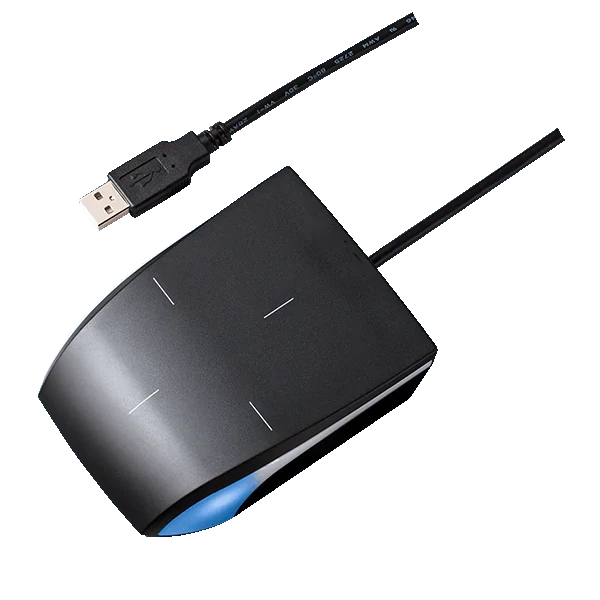
Add enrollment, legacy Prox, QR, or long-range capabilities where the application requires them.


STid supports customized reader appearances, including logo printing, decorative case effects, and color choices for projects where aesthetics matter.
IMRON's STid reader offering combines smart cards and mobile access across a common reader family. This gives projects room to support current credentials while moving toward encrypted mobile and smart-card technologies.
For legacy installations, optional Prox modules can extend selected readers to 125 kHz formats rather than forcing every credential to be replaced on day one.
Common questions about STid Green and Blue mobile credentials, credential management, and reader compatibility with UnityIS®.
Green credentials are free and provide a simple way to use a smartphone as an access credential. Blue credentials have a one-time nominal cost per credential and provide additional credential management capabilities through UnityIS, including issuing, transferring, revoking, and deleting credentials.
Yes. Green mobile credentials are free. The user installs the STid mobile application on their smartphone, and a unique credential number is automatically generated. The user then provides that number to the UnityIS administrator so it can be assigned to them in the access control system.
The user first installs the STid mobile application. The app automatically generates the user's credential number. That number must then be provided to the UnityIS administrator, who enters it into the user's credential information in UnityIS.
Blue credentials are issued directly from UnityIS. The administrator assigns a mobile credential to a person, and an invitation is emailed to that user with instructions to install the STid mobile application and activate their credential. This eliminates the need for the user to manually provide a credential number to the administrator.
Yes. Blue credentials have a one-time nominal cost per credential. There is no recurring credential subscription fee from IMRON.
Yes. Blue credentials can be managed through UnityIS and can be transferred when appropriate, making them useful when employees leave or credentials need to be reassigned.
Yes. Blue credentials can be revoked or deleted through UnityIS. This gives administrators centralized control over the mobile credential lifecycle.
Green is a good choice when you want a free mobile credential and don't mind having users provide their generated credential number to the UnityIS administrator. Blue is better suited for organizations that want centralized credential issuance and management directly from UnityIS.
No. The Green credential is a single-mode credential supporting Card Mode. The Blue credential is a multi-mode credential supporting Card, Remote, Tap Tap, Slide, Hands-Free, and Voice modes, depending on the STid reader being used.
Yes. The STid reader family can also support physical 13.56 MHz credentials. IMRON offers MIFARE Classic cards and keyfobs in addition to mobile credentials.
Selected STid readers can use an optional Prox Reader Module to add support for legacy 125 kHz credentials, including 26-bit, 35-bit, and 37-bit Prox formats.
Technical information is available to everyone. Authorized IMRON dealers can sign in to view dealer pricing and order supported STid products online.
Use STid readers to support encrypted smart cards, mobile credentials, and specialized reader options while managing access through UnityIS®.