

0 item(s)
View cart
You have no items in your shopping cart.
Last Updated: September 11, 2026
The global physical security market is projected to grow from $169.1 billion in 2026 to $256.4 billion by 2033, yet most organizations still treat scaling security for multi site facilities as simple multiplication: take one site's setup and repeat it. That mental model fails because distributed operations introduce complexity that single-site security never faces. According to Security Megatrends 2026 Vision Report, artificial intelligence is now the most impactful disruption in the industry, shifting systems from hardware-dominant to software-integrated environments. At IMRON Corporation, we've watched this shift expose a hard truth: fragmented management across locations creates blind spots no single camera or badge reader can close. Below, we'll walk through six steps that separate organizations managing 15 sites from those drowning in them.
A physical security risk assessment is a systematic evaluation of each location's vulnerabilities, access points, and threat exposure. Start by cataloging every entry point, camera, controller, and legacy system at each site before comparing them side by side.
Most teams skip this and jump straight to buying hardware. That's backwards. According to Secureframe's 2026 Cybersecurity and Compliance Benchmark Report, which surveyed over 250 security and compliance leaders, budgets are being reshaped by AI integration and multi-site operational complexity, not by hardware refreshes.
Build your assessment around three outputs:
Unified physical security management is the practice of controlling access, video, intrusion, and visitor systems across all locations through one platform rather than separate site-level tools. The architecture decision, cloud, on-premises, or hybrid, determines everything downstream, including how fast you can onboard a new site and what happens when the network drops.
Most multi-site guides stop at "go cloud." That advice is incomplete. The real architectural question is where the decision logic lives. There are three common patterns:
For distributed operations, the second pattern is the one most practitioners converge on. It preserves local uptime while giving headquarters a single pane of glass. The trade-off is that you now have two things to keep in sync: the cloud configuration and the edge cache. Credential revocation, for example, must propagate to every controller, if a terminated employee's badge still works at a site that lost connectivity last week, your architecture has a gap.
This is where open architecture matters. A platform that integrates with existing access control hardware, cameras, and third-party systems avoids a rip-and-replace cycle. The practical test is whether the platform can ingest events from hardware you already own, legacy controllers, ONVIF-compliant cameras, existing intrusion panels, without a proprietary bridge. For a 15-building, three-state operation, that distinction is the difference between a six-month rollout and a two-year budget fight.
Three integration questions to answer before you commit:
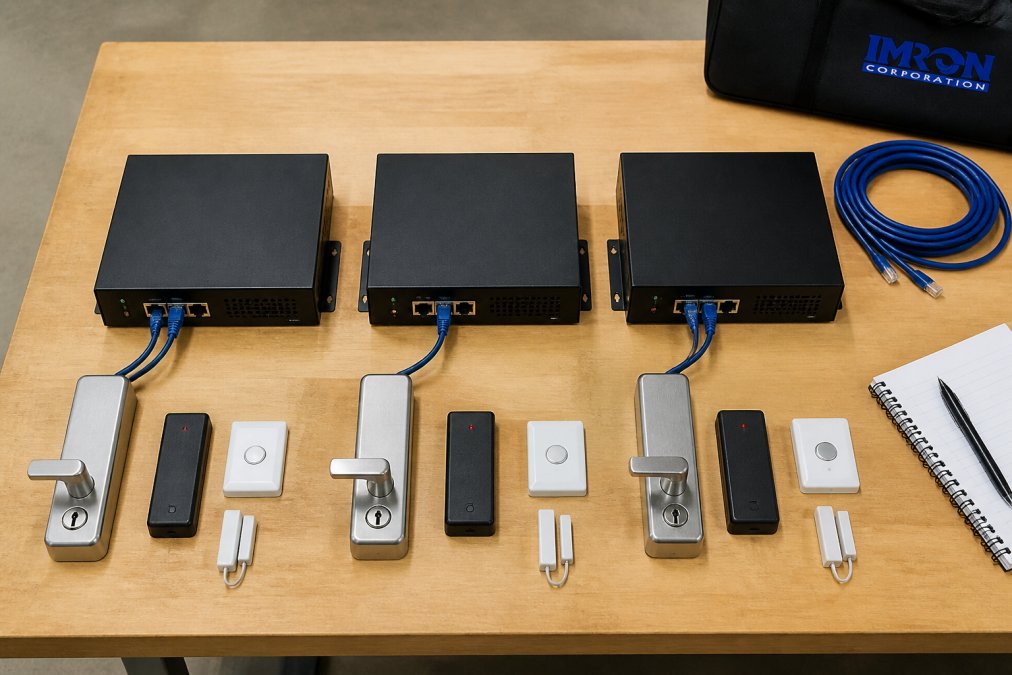
Standardization means every site follows the same access rules, credential formats, and hardware refresh cycles. Without it, your Denver office runs different badge logic than your Atlanta warehouse, and nobody can audit either.
Hardware lifecycle management is the piece nobody budgets for. Controllers, readers, and cameras have different failure curves. Track replacement dates per site, not per fleet, or you'll discover a dead controller during an incident.
Multi-site intrusion detection best practices center on correlating alerts across locations so a single operator can distinguish a real threat from a sensor fault. The core principle: reduce noise before adding sensors.
Industry surveys for 2026 show organizations still rely on familiar technologies like video integration and mobile credentials, but economic pressure is pushing them toward unified, scalable platforms to maintain visibility across locations (EXTERNAL_LINK: Gallagher Security Industry Trends Report | security.gallagher.com).
Three practices that separate effective deployments from expensive ones:
Multi-site security KPIs should measure operational efficiency, not just incident counts. But KPIs alone won't get a rollout funded. The gap most multi-site guides leave open is the financial model: how you translate operational improvements into a number a CFO will approve.
Start with the KPI layer. The metrics that matter most tie directly to resource allocation and risk mitigation.
KPI |
What It Measures |
Target Direction |
|---|---|---|
Mean time to incident response |
Speed from alert to action |
Lower |
False alarm rate per site |
Detection accuracy |
Lower |
Credential audit completion |
Compliance readiness |
Higher |
Cross-site incident resolution |
Unified operations maturity |
Higher |
Cost per monitored site per month |
Operating efficiency |
Lower |
Onboarding time for a new site |
Scalability of the platform |
Lower |
Now build the ROI model. There are four cost categories and three benefit categories that most business cases get wrong.
Costs to model explicitly:
Benefits to quantify:
A simple payback calculation: total first-year cost divided by annualized benefit. Most multi-site rollouts that consolidate monitoring and extend existing hardware land in a 12-24 month payback window. If yours doesn't, the scope is probably too broad for a first phase.
Don't build the business case on hardware savings alone. Hardware is a one-time cost; the recurring platform fee is what determines long-term ROI. A cheaper controller with a higher per-door subscription can cost more over five years than a premium controller with a flat platform fee.
Organizations are moving toward standardized processes across all locations to ensure consistency and accountability (Limble CMMS maintenance insights(https://limble.com/blog/)). Tie each KPI to a dollar figure where you can, cost per monitored site and onboarding time per new site are the two that most directly demonstrate whether the platform is actually scaling.
Cybersecurity for physical security devices is the angle most multi-site guides skip entirely. When you unify access control and video into one platform, you've created a high-value target, and your CISO will ask about it.
The answer isn't avoiding unification. It's building it correctly. A hardened gateway like the UnityIS Secure Gateway at $500 connects cloud management to local controllers using outbound-only encrypted connectivity, with no port forwarding or inbound firewall exposure. That's how you get centralized management without creating a single point of failure.
Change management is the other half. On-site staff at each location need to understand why their familiar local system changed. What most guides miss is that resistance isn't technical, it's territorial. Give site managers visibility into their own location's data and they'll adopt faster.
Start with a physical security risk assessment at each site, then deploy a platform that manages access control, video, and intrusion from one interface. Cloud-based management lets you push policy changes to every location at once instead of configuring each panel separately. Standardize hardware models and naming conventions so reporting stays consistent. The 2026 Security Megatrends report from the Security Industry Association notes the industry is shifting from hardware-dominant systems to software-integrated environments, which makes centralized multi site security practical at scale.
The 5 D's are deter, detect, delay, deny, and detain. They still apply, but the execution changes when you run distributed operations. Deterrence and detection depend on consistent camera coverage and access control at every site, not just the flagship location. Delay and deny depend on standardized door hardware and lockdown procedures. Detain depends on how fast your team can act on real-time visibility from a central console. Without standardization, each site enforces the 5 D's differently, which creates gaps attackers can find.
It depends on whether the hardware supports open protocols. Open-architecture platforms integrate with leading access control hardware, cameras, video management systems, intercoms, and AI analytics, so most ONVIF-compliant cameras and standard Wiegand or OSDP readers keep working. Controllers that only speak a proprietary protocol may need replacement. Ask for an integration list before committing. Preserving existing infrastructure is the main reason organizations choose open platforms over rip-and-replace migrations, since it protects capital already spent.
A hybrid deployment solves this. Controllers keep their credential database locally, so doors still open and badges still read when the cloud is unreachable. A hardened on-premises gateway, such as the UnityIS Secure Gateway, maintains outbound-only encrypted connectivity to the cloud without port forwarding or inbound firewall exposure. When the connection returns, events sync automatically. This setup gives you cloud-based management for reporting and remote monitoring while keeping each site operational during an outage.
Managing security across distributed locations gets harder with every site you add, and fragmented systems make it worse. IMRON Corporation built UnityIS® specifically for this problem: open architecture that integrates your existing cameras and controllers, flexible cloud, on-premises, or hybrid deployment, and centralized monitoring that scales from one building to thousands. Explore the platform and see how unified physical security management changes what your team can actually accomplish.
 IMRON Corporation